CYBERSECURITY A-Z
What Is IoT Security?
IoT (Internet of Things) security is the process that makes IoT and all IP-connected devices visible and controllable. In today’s digitaxl terrain, where countless internet-enabled sensors and specialized devices connect and intersect, organizations need a cybersecurity solution that makes all devices visible and controllable. Otherwise, any device can be compromised and exploited for malicious purposes.
The number of IoT devices worldwide is forecast to almost double from 18 billion in 2024 to more than 32 billion in 2030. Major industries that have already deployed more than 100 million IoT devices include: Electricity, gas, government, retail and wholesale, steam and a/c, transportation and storage, and water supply and waste management.i
What Are the Security Risks of IoT Devices?
As highly valuable and often critical corporate assets in a digital ecosystem, these devices boost productivity, enhance product and service quality, and improve the bottom line. But they are also susceptible to cyberattacks and malware because they often exist invisibly on enterprise networks – and many were not designed to be secure.
Unlike with traditional systems, these devices can be more difficult to track, and they rarely support software agents. As a result, they expand an organization’s attack surface and greatly increase cyber risks with attackers often targeting them as entry points into vulnerable networks.
Even when IT is aware of these devices on the network, they often struggle to patch and manage each one — and can be compromised directly via authentication due to weak passwords, default settings, poor configurations, or unpatched firmware and specialized operating-system vulnerabilities.
The Cybersecurity & Infrastructure Security Agency (CISA) noted that the many cybersecurity and resilience risks involving IoT devices are not new. However, CISA states, “the scale of interconnectedness created by the IoT increases the consequences of known risks and creates new ones. Attackers take advantage of this scale to infect large segments of devices at a time, allowing them access to the data on those devices or to, as part of a botnet, attack other computers or devices for malicious intent.”ii
Which IoT Devices Pose the Greatest Risk?
In 2025, the riskiest devices include several persistent threats from previous years and one newer one within the attack surface, according to Forescout’s annual Riskiest Devices report.
Network Video Recorders, VoIP Systems, IP Cameras
These remain high-risk because they are often exposed to the internet, contain easily exploitable firmware vulnerabilities or their authentication process can be easily bypassed, so they have a long history of being targeted by criminal botnets and Advanced Persistent Threats (APTs).
NAS Systems
These network-attached storage systems share the same risks as other devices – internet exposure, firmware vulnerabilities, and frequent exploitation. However, they face an additional threat from ransomware actors. Since 2021, with the advent of QLocker, ransomware groups have increasingly targeted NAS systems. Today, multiple ransomware families are specifically designed to infect NAS devices with malware, exploiting the valuable data they store and their security weaknesses.
Point of Sale Devices
These process customer transactions, such as sales in retail stores. They may run traditional IT operating systems (e.g. Windows) or dedicated embedded OSes. These devices have long been prime targets for cybercriminals, who deploy keyloggers and infostealers to capture sensitive data. Additionally, RAM scrapers scan the system’s memory for credit card numbers and payment data before encryption. Certain PoS devices also contain specific vulnerabilities that attackers can exploit to gain deeper system access.
Riskiest Device Categories
| IT | IoT | OT | IoMT | |
|---|---|---|---|---|
| 1 | Application Delivery Controller (ADC) | Network Video Recorder (NVR) | Universal Gateway | Imaging Devices |
| 2 | Intelligent Platform Management Interface (IPMI) | Network Attached Storage (NAS) | Historian | Lab Equipment |
| 3 | Firewall | VoIP Systems | Building Management System (BMS) | Healthcare Workstations |
| 4 | Domain Controller | IP Camera | Physical Access Control Systems | Infusion Pump Controller |
| 5 | Router | Point of Sale (PoS) Systems | Uninterruptible Power Supply (UPS) | Picture Archiving and Communication System (PACS) |
Source: Forescout Research
Past Reports on Device Risk
IP cameras, VoIP and video conferencing systems often show due to internet exposure and have a long history of threat actors targeting them. For example:
- In 2019, compromised VoIP phones allowed attackers to gain initial access to multiple networks.
- In 2021 IP cameras allowed Conti malware to move within affected organizations.
- In 2022, both threat actors UNC3524 and TAG-38 targeted video conferencing and cameras for use as command and control infrastructure.
ATMs
ATMs have also appeared on our annual list because of their obvious business criticality in financial organizations and because many ATMs stand adjacent to, other devices, such as security cameras and physical security systems that are often exposed.
Printers
Printers present vulnerability risks, including multifunctional printing and copying devices used in the connected office, as well as specialized devices for printing receipts, labels, tickets, wristbands, and other items. Like IP cameras, printers have been exploited in intrusions by threat actors, such as APT28, and spammed by hacktivists on multiple occasions. They often connect to sensitive devices, such as point-of-sale (POS) systems (think receipt printers) and conventional workstations with privileged users, including office printers.
IoT Security Best Practices
These devices require the following essential practices to prevent potential threats including:
- Discover and classify 100% of IP-connected devices: It’s essential to obtain complete visibility and device context of all IoT endpoints across your network environment. To do this, use a cybersecurity platform that can discover all devices as soon as they enter your network. Since you must discover all devices, the technology you leverage should provide for devices that do not allow for agents. Agentless discovery will ensure that you capture everything.
- Implement dynamic network segmentation and controls: Proper IoT security requires network segmentation and orchestrated incident response across all domains. To do this, you must be able to:
- Correlate access with user identities (who is doing what, where, when and why)
- Provision devices to dynamic network segments based on policies and real-time context
- Map data flows to design segmentation policies and simulate them for non-disruptive deployment
- Automate segmentation to reduce security and operational risk
- Orchestrate security and enforce compliance: Rather than using traditional, expensive, single-purpose security solutions that cannot share knowledge or coordinate incident response, leverage a security solution that can share device context with other IT and security products. This will enable you to automate workflows and policy enforcement across disparate solutions. The benefits of taking this step include:
- Increase security and overall device compliance
- Reduce mean time to detect and respond
- Increase ROI from your existing tools
- Streamline updates to your configuration management database (CMDB)
FAQ on MAC Spoofing: How to Detect and Prevent Rogue IoT Devices
What’s the problem with rogue devices?
Bypassing the perimeter to gain entry into the internal network can let bad actors have a field day. We use identity checks to restrict access to the LAN and keep out rogue devices, but what happens when your copy machine gets carbon copied? That’s where MAC spoofing comes in—it’s one of the primary methods rogue devices use to get around your network controls.
What’s a MAC address and why does it matter?
Media Access Control (MAC) addresses don’t get as much attention as IP addresses, but they’re how frames actually get delivered, hop-by-hop. Their format is made up of six hexadecimal octets. The first three are the OUI (organizational unique identifier), which is assigned to various manufacturers. The latter part is the unique address given by the vendor.
Usually, you’ll see devices of the same make and model share the first three, or even four octets. Since they aren’t assigned by the network itself, efforts are made to ensure they’re unique to avoid conflicts. So naturally, they became relied on as a device’s identifier—and that’s just what a MAC spoofing attack takes advantage of.
How does MAC spoofing work?
That MAC address is far from secret. In many cases, a device has its MAC address labeled right on the back of the machine, making it very easy for an attacker to copy it and configure it on their laptops or other equipment.
This is an issue because many network access controls and other systems use a device’s MAC address to track it, and in some situations even serve as the means for admission to the network. This is often the case for IoT and OT devices, which typically aren’t set up to authenticate for 802.1X. However, even for devices using more secure credentialed access, MAC spoofing is a problem, as we’ll see later.
How can I think about detecting MAC spoofing?
Let me relate it to something very similar that happens with people: identity theft. Say our friend Bob Hodges is a victim of impersonation. Here are some methods we can use to judge if Bob is really who he claims to be:
- Co-location – A clear sign. If two people claiming Bob’s identity are in the same place at the same time, then one of them is an imposter.
- Character changes – These can occur naturally, so careful consideration is required. While Bob is known to keep clean-shaven, it’s possible for him to grow a beard. But if he’s also a foot shorter and sporting a new tattoo, then something is clearly afoot.
- Behavioral changes – Can be weak or strong indicators. If Bob is a known lefty but is seen writing with his right, that’s a good tell. However, if Bob usually takes coffee in the morning and one day has tea, not so much.
Pretty straightforward concepts, right? Let’s apply them and see how they can be used to catch MAC spoofing attacks in the network.
Method 1: How does network co-location detection work?
Since a MAC address is usually unique, there should be only one device claiming it at any given time. If you have visibility into the network and can track where a MAC address is connected, you can put a system in place to detect either duplicate MAC addresses or a single MAC rapidly moving between two different places. That behavior will depend on how the network is designed and where the attacker is connecting from.
How do I implement it?
By querying the MAC address table of a switch, we can see which port it was learned on. You’ll want to focus on the access ports and not the trunks or uplinks, which also carry MAC addresses to the upstream switches.
When two devices share the same MAC, how it appears in the MAC address table will vary depending on if it was learned on the same VLAN or not. This is because MAC learning is per-VLAN.
- If same VLAN: The two devices will fight for contention of the MAC table. To detect this, you’ll need fairly frequent polling or receive something like MAC notification traps. Also, some IoT devices may not be as chatty and lead to the other MAC dominating the table.
- If separate VLANs: Both will appear in the MAC address table, one for each VLAN, and can be more easily detected.
How effective is co-location detection?
Let’s start with the precondition: both the victim and the attacker need to be concurrently connected to the network. Some attacks might involve rip and replace, or reusing a MAC from a decommissioned device. In those cases, this method won’t help you.
However, if the conditions are met, this makes for a very reliable way to catch a rogue device trying to enter the network. A short allow list for failover and link aggregation setups will help avoid most false positives. Also, consider going the extra step and keeping a history of who was seen first where to differentiate victim and attacker locations.
Method 2: How does character change detection work?
We want to use key properties of a device as a baseline of what it should look like, and then alert on any significant deviations. Detections need to factor both the number and likelihood of a change.
As we know, devices aren’t completely static, and parts of the configuration might naturally change with maintenance or operation. So events like a change in hostname? It’s possible. But a change from one OS to another? That should raise some concerns.
For that reason, the strategies most effective usually make use of a weighted analysis paired with robust inspection.
How do I gather identifying properties?
We can learn a great deal about a device just by inspecting its traffic on the network: the way it sends DHCP requests, how fields are set in the IP packet, as well as the contents within. If you add on active inspection methods that scan open services, you can get an even more detailed set of properties to work with.
Once you have a system to gather these properties, you can monitor for changes and apply logic to tune for detection criteria.
What approach should I use?
- For IoT and purpose-built devices (like IP cameras): Use a matching approach where each device has to fit known criteria.
- For more dynamic devices (like workstations): Measure deviations from baseline.
You also need to consider not only a change, but the absence of an identifier.
How effective is character change detection?
For starters, it can work even if the victim has been disconnected from the network. Depending on how well it’s tuned, it can provide good detection capabilities.
Where it struggles is if the attacker is using a device very similar to the victim, especially if you have a skilled hacker who has prior knowledge of its configuration and mirrored its settings.
Overall, character change detection makes for a great foundation to build from—and let’s do just that.
Method 3: How does behavioral change detection work?
Observing changes in a device’s behavior can give us the warning we need, even when dealing with a sophisticated attacker. Similar to character changes, behavior could change naturally, so we’ll need to be sure to account for that when we assign severity to different events.
The good news is that most of what a device does needs to communicate over the network or touch a managed resource. So provided we can inspect that traffic or view service logs, we can put in place some pretty effective rules.
What behaviors should I look for?
Here are examples of general changes that could apply to any device:
- Internal devices switching to external DNS or NTP
- Seeing DHCP packets from devices which should be statically configured
- TLS fingerprint changes
- Attempting to access resources it shouldn’t
You can also compare traffic patterns to baselines you have for that device type. Having Zero Trust rules in place can really aid in detecting abnormalities. And of course, any potential malicious behavior detected by other systems should have those events forwarded for investigation.
How effective is behavioral detection?
Detecting changes in device behavior can be very effective in catching skilled attackers. Even if they pass the previous method by successfully mimicking a device’s character, when we monitor their behavior, the attacker now has the added challenge and restraints of having to act like the victim too.
Behavioral detections also have the benefit of not only detecting rogue devices, but compromised ones as well.
The drawback is that it can be an investment to configure and tune to avoid false positives. However, the more extensive your rules, the higher the bar you set for your attackers.
Wait, can’t I just use 802.1X for everything?
You might be thinking, “If I could just use 802.1X for everything, I can avoid this problem entirely.” However, there is an increasingly exploited attack method which can circumvent it.
What’s a bump-in-the-wire attack?
It works by taking an 802.1X authenticated device and disconnecting it from the network. A simple hub is then attached between the client and the switch. This allows the device to authenticate again and open up the port. That’s all the attacker needs, because when they connect their MAC spoofed device to the hub, it now can take advantage of that already open switch port.
This is known as a bump-in-the-wire attack, and it can be very challenging to detect, especially if the attacker goes into stealth mode. Here, character and behavioral change detections will prove helpful in this scenario.
What’s the trend I should understand?
Those of you who have been doing security for a while are probably already seeing the trend. As the sophistication of the attacker increases, it requires increasingly elaborate detection methods to catch them.
Can I prevent MAC spoofing attacks at the source?
What if you could just prevent MAC spoofing attacks from ever being executed, right at the source where it connects to the network? There are some configurations you can make to help, but it will largely depend on your infrastructure and client compatibility.
What about MACsec?
As we discussed, 802.1X can help a lot, but it’s not foolproof. However, if you pair it with technologies like MACsec, you can make it far more secure.
MACsec works by establishing an authenticated and encrypted layer two channel on the link between the switch and the client. This blocks unauthenticated frames from other sources, even if they’re using the same MAC address. While it’s primarily used between network devices, there is support among client OSs like Windows and Linux. Just do some homework.
What other network settings can help?
There are a range of other network settings which can be effective, depending on your environment:
- Sticky MAC port security – Only allows connectivity for the configured MAC address.
- DHCP snooping – For dynamic zones, helps build a trusted table of IP, MAC, VLAN, switch port, and lease. This allows for additional settings like:
- Dynamic ARP inspection – Can shut down unauthorized ARP
- IP source guard – Restricts layer two traffic to clients in that binding table
It certainly adds some management complexity, but it can help broaden your coverage.
What about wireless networks?
You’ve probably noticed nearly all of what we’ve talked about applies to wired networks. That’s because most modern wireless security requires credentials for access and uses protected management frames, so it can’t be hijacked by MAC spoofing alone.
However, if only MAC filtering is securing your wireless LAN, then that’s a different story.
Any other detection methods I should consider?
One last thing. A common check for device manageability can also work effectively for detecting potential rogue devices. This can include:
- Monitoring if any software agents required are reporting in for that device
- Enrollment verification in your management solutions
- Leveraging remote credential checks to see if a known service account can authenticate and alert on any failures
This not only works great for common IT devices like Windows over WMI or SSH for Linux, but protocols like SNMP can be used for IoT devices too.
How Forescout Helps
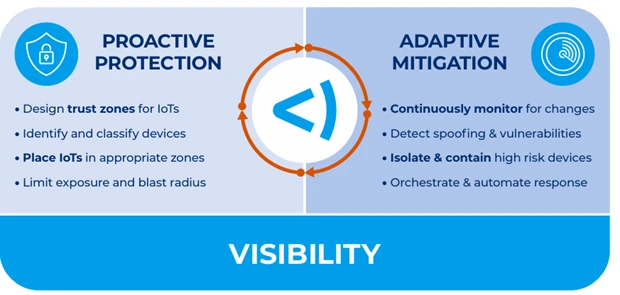
Forescout takes a Zero-Trust approach by combining complete device visibility, proactive network segmentation, and least-privilege access control of all digital assets – devices, users, apps, and workloads. The Forescout Vistaro™ platform enables you to effectively manage cybersecurity, operational, and compliance risks across your environment by:
- Providing complete visibility into unmanaged IoT devices as well as all IP-connected systems
- Assessing and identifying IoT devices with factory-default or weak credentials and automating policy actions to enforce strong passwords
- Providing real-time insight into IoT devices’ communication and risky behavior across the extended environment
- Segmenting devices into trusted zones by enforcing least-privilege access by zero trust policy
- Automating unified zero trust policy orchestration across multivendor environments and multiple network domains
- Eliminating security management silos to accelerate response and maximize the value of your investments in other security solutions
- Helping your organization proactively detect and reduce vulnerabilities and granularly enforce segmentation and network access rules, and immediately contain IoT device threats while facilitating remediation
Expert in Assessing IoT Device Risk
As part of the Forescout Vistaro™ platform, Multifactor Risk Scoring works to further your efforts in assessing and governing your IoT devices with comprehensive risk profiles. Multifactor risk scoring gives your security operations center (SOC) the advantage of working on the vulnerabilities and exposure in your current security framework that misalign it from your desired compliance state. Instead of working feverishly on volume, you work on criticality to your network. Forescout device risk scores result from three main factors:
- CONFIGURATION: Number and severity of vulnerabilities on the device as well as the number and criticality of open ports
- BEHAVIOR: Reputation of inbound connections to – and outbound connections from – the device, along with its internet exposure
- FUNCTION: Potential impact to the organization if the device is compromised
Forescout offers an asset-centric approach to IoT. This helps you create a proactive strategy to deal with your network’s vulnerability effectively and efficiently at scale.
To learn more, visit www.forescout.com/solutions/iot-security/.
[i] Lionel Sujay Vailshery, Statista (2024). Number of Internet of Things (IoT) connections worldwide from 2022 to 2023, with forecasts from 2024 to 2033, September 11, 2024. Statista. Accessed March 19, 2025 from the following source: https://www.statista.com/statistics/1183457/iot-connected-devices-worldwide/
[ii] CISA (2021). Securing the Internet of Things (IoT), February 1, 2021. Accessed March 19, 2025 from the following source: https://www.cisa.gov/news-events/news/securing-internet-things-iot